
If you run a WooCommerce store, you have probably used a simple “10% off” coupon at some point. It works well for straightforward promotions, but it cannot cover every situation.
Sometimes you may want to move slow-selling inventory, encourage customers to buy more, or give existing customers a reason to return.
But you cannot do all of this with WooCommerce’s default coupon setup.
That is where WooCommerce Smart Coupons by StoreApps comes in. It adds BOGO deals, store credit, gift cards, bulk coupon generation, URL coupons, and more advanced coupon rules to the standard WooCommerce coupon setup.
In this review, we’ll look at its main features, pricing, and whether it is worth considering for a WooCommerce store.
WooCommerce Smart Coupons – Overview
WooCommerce Smart Coupons is a plugin by StoreApps. It is the original WooCommerce coupons plugins that has been available for over 13 years and includes features beyond the basic coupon options available in WooCommerce.
Along with regular coupons, you can manage store credit, gift cards, bulk-generated codes, and advanced promotional rules.
You also control how customers use coupons. Depending on your promotion, you can restrict codes by products, customers, quantities, spending limits, expiry dates, payment methods, and shipping methods.
Here are some of its main features.
1. BOGO and Buy X Get Y Offers
The BOGO options in Smart Coupons are more flexible than the basic coupon rules in WooCommerce. You can set up:
- Buy one, get one free
- Buy one, get one at 50% off
- Buy two, get one free
- Buy X, get Y
- Buy from one category, get a product from another category
For example, a clothing store could offer a free cap when a customer buys two T-shirts, or give 50% off a second pair of jeans.
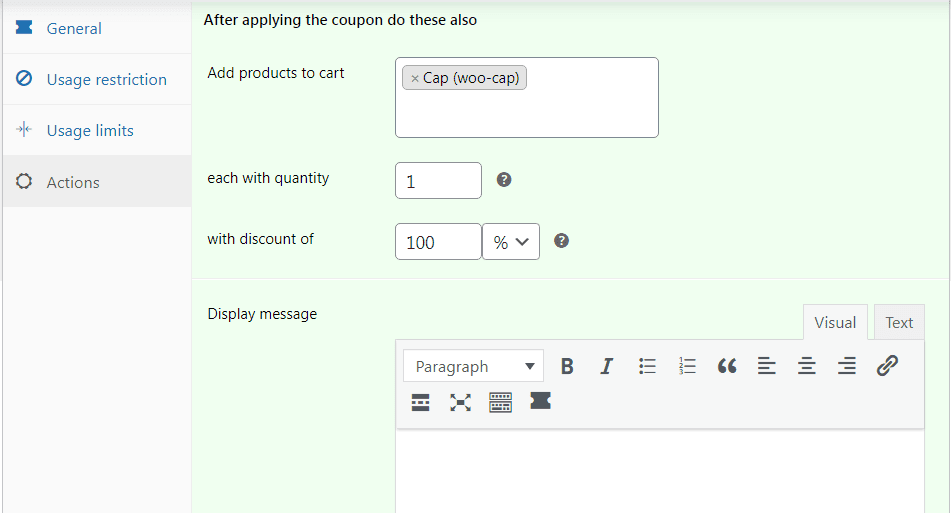
The qualifying product and the reward can be different, so you can use these offers to promote complementary products or move specific items.
Smart Coupons can also add the eligible product to the cart automatically and display a message explaining the offer. This saves customers from having to figure out which product they need to add to qualify.
For stores that regularly run BOGO or Buy X Get Y promotions, this is considerably more flexible than WooCommerce’s standard coupon options.
2. Gift Cards and Store Credit
Gift cards and store credit are two features that make Smart Coupons more than a typical WooCommerce coupon plugin. Instead of using coupons only to reduce the price of an order, you can use the same system for gift cards, store credit, refunds, and customer rewards.
For gift cards, you can create fixed-value cards such as $25, $50, or $100, or allow the customer to enter a custom amount.
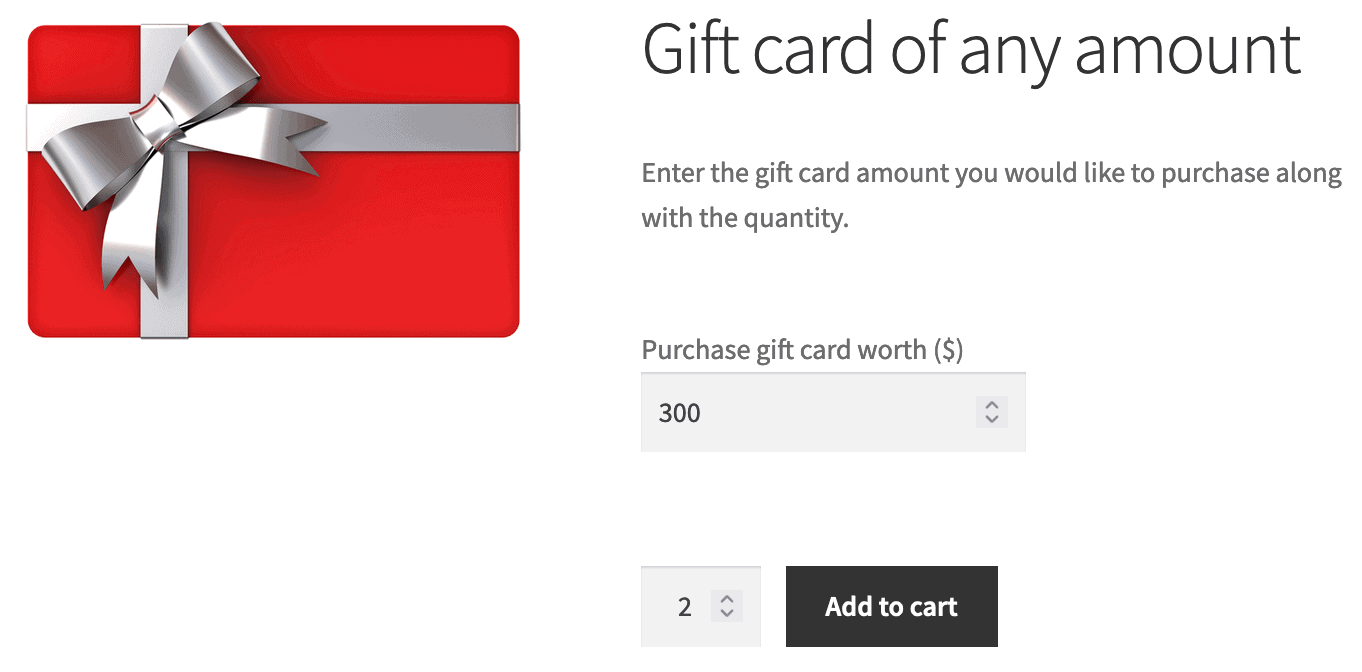
Customers can buy a gift card for someone else, add a personal message, and schedule when it should be delivered.
So, if someone wants to send a gift card for a birthday or anniversary, they can set everything up while placing the order and schedule it for the right date.
Store credit is useful when you want to give customers spending credit instead of another discount code. For instance, after a customer returns a $99 order, you could issue $99 as store credit.
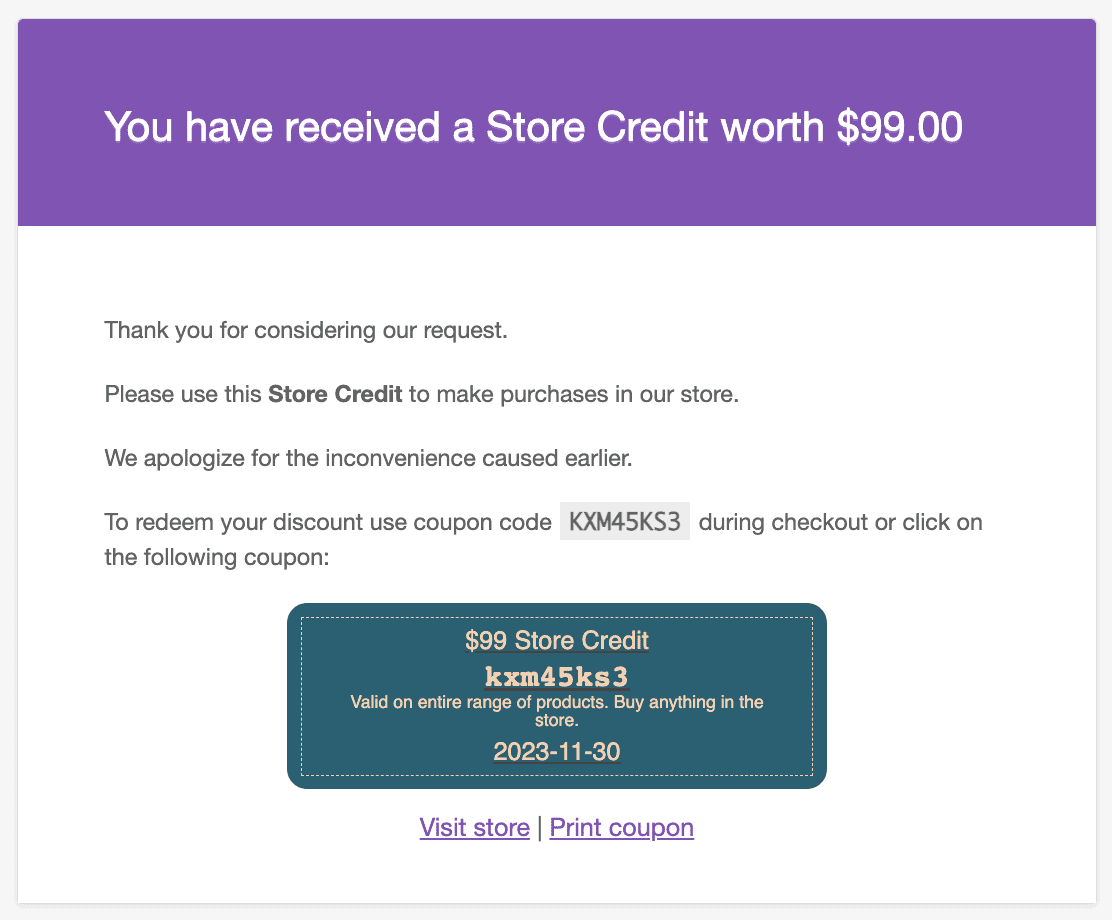
They can then use that balance over one or several future orders until it runs out. The same credit can be used for cashback, rewards, or promotional campaigns.
You can also generate gift cards and store credit in bulk. That can be useful for employee rewards, affiliate incentives, or campaigns where hundreds of customers receive a specific credit amount.
This combination is one of Smart Coupons’ stronger features. If gift cards, refunds through store credit, cashback, or customer rewards are part of your sales strategy, it gives you functionality that a standard WooCommerce coupon setup doesn’t provide.
3. URL Coupons That Apply Discounts Automatically
URL coupons are another useful feature in Smart Coupons, especially for promotions shared through email, social media, affiliates, or landing pages.
Instead of asking customers to remember and enter a coupon code, you can share a link that applies the discount when they click it.
For example, you’re running a sale and want to offer a 10% discount that customers can redeem simply by clicking a link.
You can create the coupon, copy the shareable link, and share it with your customers.
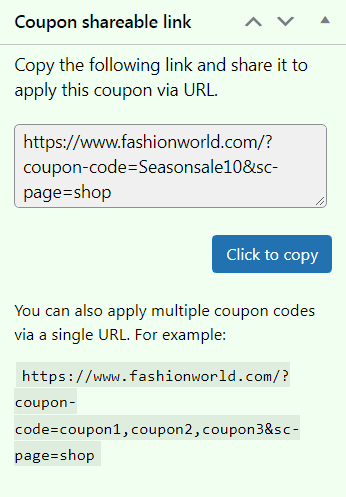
Once they click it, the coupon is applied automatically. You can also configure the link to add a specific product to the cart and send the customer to a particular page after the coupon is applied.
Additionally, Smart Coupons allows you to apply multiple coupon codes from a single shareable link. Just separate each coupon code with a comma.
4. Bulk Generate Unique Coupon Codes
Need a different coupon code for every customer? Creating hundreds of them manually would take a lot of time.
Smart Coupons allows you to generate large batches of unique codes while keeping settings such as the discount, expiry date, and usage limits consistent.
You can then export the generated coupons and distribute them to customers.
You can also organize coupons into categories, which makes it easier to manage different campaigns and promotions.
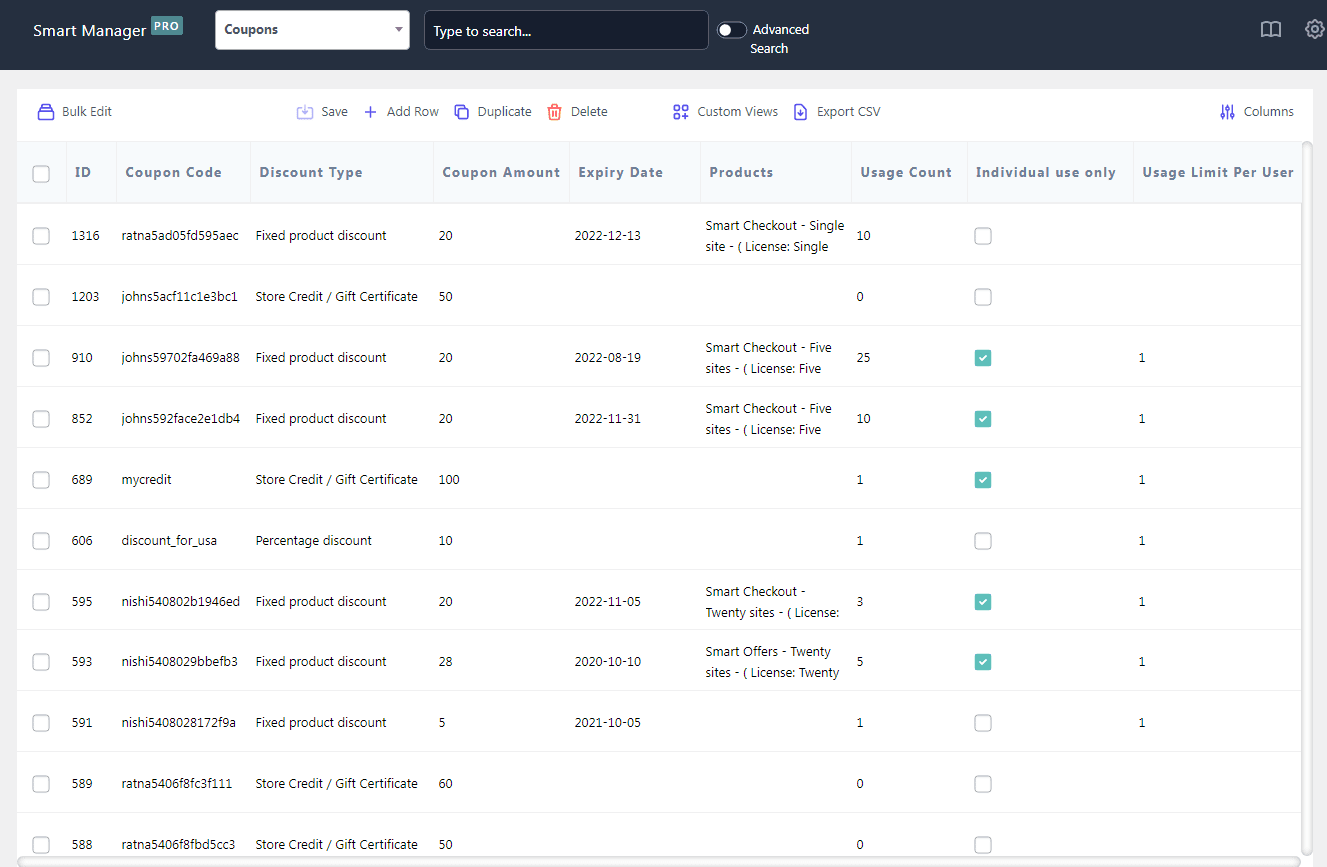
If you already have a large number of coupons in your store, you can integrate Smart Coupons with Smart Manager to bulk manage coupons from your dashboard.
5. Quantity and Tiered Discounts
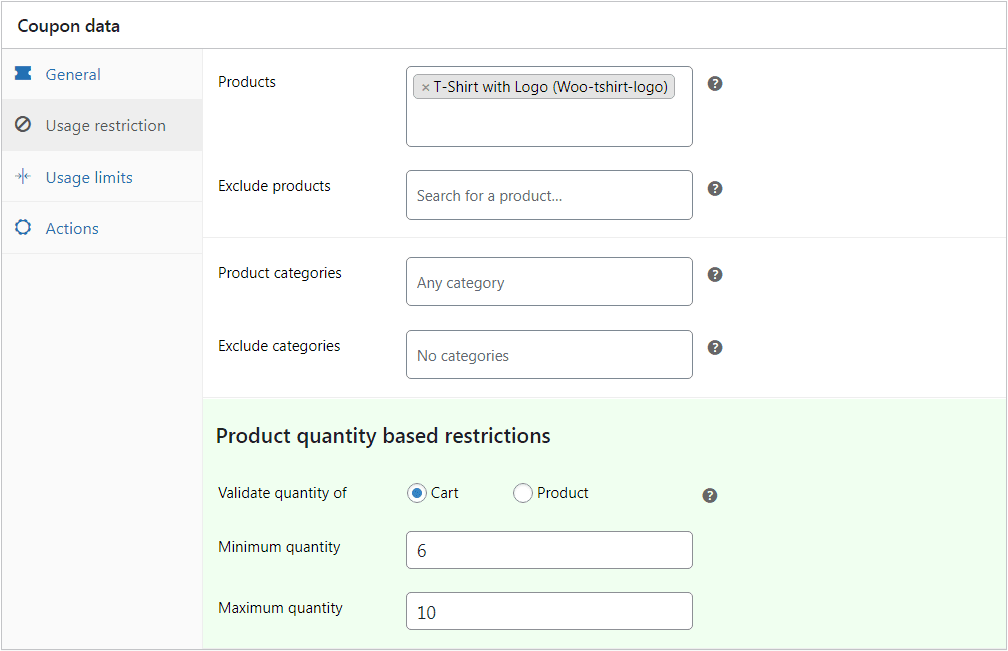
Smart Coupons allows you to set discounts based on the quantity of products in the cart. You can apply the rule to the whole cart or limit it to specific products, categories, or attributes.
For tiered discounts, you can create separate coupons for different quantity ranges.
For example, you could offer 5% off when a customer buys 5–10 items, 10% off for 11–20, and 20% off for 21 or more. Each coupon can have its own minimum and maximum quantity.
The same rules can be applied to specific products or categories. A clothing store, for instance, could offer 5% off when a customer buys five or more T-shirts.
You can also narrow the offer using product attributes, such as applying a discount when a customer buys three or more red clothing items.
6. Advanced Coupon Restrictions and Targeting
This is one of the areas where WooCommerce Smart Coupons goes beyond WooCommerce’s basic coupon options. You can control not just the value of a discount, but also who can use it, what they can use it on, and under what conditions.
Coupons can be restricted by products, categories, brands, customer email addresses, user roles, location, payment method, shipping method, and product attributes.
You can also set minimum or maximum spend requirements, exclude sale items, and put a maximum discount on percentage-based coupons.
For example, you can offer 20% off to new customers on a particular product category, require a minimum $100 order, exclude sale items, and limit the discount to $50.
You can also restrict the coupon to specific email addresses or customer roles when the promotion is intended for a particular group.
Usage limits add another layer of control.
You can limit how many times a coupon can be redeemed overall and how many times each individual customer can use it.
So a coupon could have 500 total redemptions while still being limited to one use per customer.
That makes it easier to run promotions with specific eligibility rules instead of relying on a coupon that anyone can use.
Other Smart Coupons Features Worth Knowing
The features above cover the main coupon and promotion tools, but Smart Coupons includes several smaller additions that may matter depending on how you run your store.
- Offer free gifts and free shipping
- Schedule coupons
- Issue cashback through store credit
- Organize coupons into categories
- Embed coupons on your site
- Customize coupon designs
- Track coupon performance through reporting
WooCommerce Smart Coupons also integrates with WooCommerce extensions such as WooCommerce Subscriptions, Affiliate for WooCommerce, Smart Manager, Smart Offers, and WooCommerce Bookings.
If your store already uses any of these extensions, those integrations can extend how you use coupons within the existing setup.
WooCommerce Smart Coupons Pricing
WooCommerce Smart Coupons costs $129 per year for one site. Multi-site and enterprise plans are also available, with pricing provided on request.
A 30-day money-back guarantee is included, subject to the terms.
Now, is $129 a lot for a coupon plugin?
If you only need the occasional 10% off coupon, probably. WooCommerce already handles basic percentage and fixed-price discounts, so paying for features you won’t use doesn’t make much sense.
But if your store regularly runs BOGO offers, gift cards, store credit, quantity-based promotions, or targeted coupon campaigns, the price is easier to justify. Instead of adding separate tools as your promotional needs grow, you get those features within the same plugin.
Conclusion
WooCommerce Smart Coupons is a strong choice for WooCommerce stores that rely on promotions to drive sales. It goes well beyond basic percentage and fixed-price coupons, giving you more ways to run BOGO offers, issue store credit, create targeted promotions, and manage larger coupon campaigns without piecing together several different tools.
For a store that only needs the occasional discount code, WooCommerce’s built-in coupons are probably enough. But if promotions are a regular part of your sales strategy, the $129 annual price is easier to justify.
Overall, Woocommerce Smart Coupons make the most sense for growing stores with regular or more complex promotional needs.